Posted on Leave a comment

Sung jingles

I sang my first radio jingle back in 1990 for none other than Radstock Superstore and since then I have been singing and producing jingles for clients and stations across the UK. I sing for all sorts of styles of jingles – pop & rock, classical, singalong and comedy.

These days producers tend to send me the backing track and I record the vocals, double tracks and harmonies here in my studio in Bath, and then I send all the separate ‘stems’  back for the producer to mix in their studio. I provide a competitively priced and fast service – and I even have a demo rate to make things even more flexible.
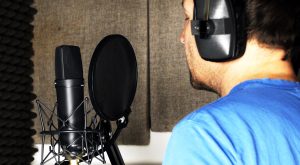
jono_singing_a_jingle
Recording a jingle with the Neumann u87 mic

Mixed and mastered jingles

However if you need the vocals produced, mixed and mastered then I have a pro recording studio in house. And if you’re looking for someone to create a jingle from scratch then I can provide that too. To find out more or discuss a project just use the contact form at the bottom of the page or give me a call on 01225 470011.

The key to getting that thick rich and clear jingle sound is double tracking – or stacking. The art of recording the same vocal part over the original – often up to three or four times. The magic happens because the small differences in the performances blend together to create a thicker more appealing sound. In other words you can’t just duplicate the track in the computer, it’s the human element that makes it come alive and stand out. Those double tracked vocals can then be individually panned to create a very satisfying ‘wide’ stereo vocal that lifts out of the mix.

Take a listen to Karen Carpenter’s studio recordings or many of John Lennon’s lead vocals in the Beatles to hear it in action, plus there’s a video below of Michael Jackson stacking up some vocals in the studio with legendary producer Quincy Jones. Quincy has him stepping further and further off the mic on each double track to create more difference and depth. The old finger in one ear whilst recording is really useful as it helps you hear the part your singing in one ear and the backing that you are trying to double in the other.

Posted on Leave a comment

Voiceover rates for ILR, in-store and Spotify 2017

Here are the new rates for 2017:

Radio Stations
£19.70 = £20
£24.20 = £24.40
£30.25 = £30.50
£33.70 = £34
£40.50 = £41
£62.50 = £63
£65.65 = £66.15
£83.85 = £85
£132.75 = £135
£237 = £240
£277 = £280
£655 = £665
£730 = £740

Currently no change to the following rates:
ISDN Premium
£121
Instore Commercials
1 – 149 stores: £26.60
150 – 299 stores: £31.40
300 + stores: £38.90
Spotify
£234.65 (6 months usage)

Posted on Leave a comment

A Cappella Jingles for Advertising

Jingles which don’t jangle

I have been singing advertising jingles for over 20 years and there is one type of jingle I love to record more than any other… I’m talking about a cappella barbershop style jingles – jingles made up of just vocals without musical instrumentation and full of rich double tracking and lovely close harmonies.

To produce them well takes quite some time and patience in the studio to get everything recorded spot on, but these days it’s certainly easier with the help you can get from things like Logic Pro’s flex time and flex pitch.
Here’s a recent example of an a cappella jingle – ok there is a tiny bit of electric piano but it’s predominately made up of about 14 tracks of vocals. Have a listen…


Or how about an a cappella jingle for a pine shop…


If you’re interested in having a jingle recorded for your business or client, you can contact Jono on 07738 470011 – or use the contact form here.

Posted on Leave a comment

Voiceover rates for ILR, in-store and Spotify 2016

Here are the new rates for 2016:

Radio Stations
£19.40  becomes £19.70
£23.95  becomes £24.20
£29.90  becomes £30.25
£33.30  becomes £33.70
£40.00  becomes £40.50
£40.80  becomes £41.30
£61.55  becomes £62.50
£64.85  becomes £65.65
£82.85  becomes £83.85
£131.20 becomes £132.75
£234.65 becomes £237.00
£273.55 becomes £277.00
£647.75 becomes £655.00
£720.00 becomes £730.00

Digital Stations
£38.95 (6 months usage)

ISDN Premium
£121

Instore Commercials
1 – 149 stores:  £26.60
150 – 299 stores: £31.40
300 + stores: £38.90

Spotify
£234.65 (6 months usage)

Posted on Leave a comment

Stacking vocals when recording jingles

I’ve spent the past 20 years singing jingles for radio and TV adverts. Part of the trick to getting that rich full sound is to stack the same vocal line over and over. It’s often called ‘double tracking’ , and although you need to match the previous recording pretty darn close – those tiny differences in performance create that thick creamy sound.

A jingle can often be sung by just one singer, but in the ‘vocal stack’ there might be three or more lead vocals,  and then each harmony line would be at least double tracked – so pretty soon you can have a stack of easily 8 or 9 tracks – sometimes many more.

For me the best double tracker ever was Karen Carpenter. So flawlessly done you can hardly tell the lead vocal is ‘multi-tracked.’

As for recording technique when you’re stacking vocals, it can really help to close one ear off with your finger to make it easier to hear yourself whilst at the same time hearing the previous take on the other side of the headphones. Also stepping gradually further from the mic as you double track a vocal line, can help create a sense of space and texture. See the video of Michael Jackson working with Quincy Jones for an inspiring demonstration.

Michael nailing the double tracking
Posted on Leave a comment

Voiceover Rates for Radio Commercials, in-store and Spotify 2015

Just before Christmas 2014, at the last minute, Equity published a new rate card for voiceover rates for radio commercials, in-store commercials and Spotify. This didn’t give much time to implement the suggested increase without warning so I continued charging the old rates during January. From February 2015 these new rates apply and you can see all the details below:

Radio Stations
£19.10 becomes £19.40
£23.55 becomes £23.95
£28.35 becomes £28.80
£29.45 becomes £29.90
£32.80 becomes £33.30 (Apart from ‘Small Listenership National DAB’s’ at £40.70)
£40.15 becomes £40.80
£41.00 becomes £41.65
£60.60 becomes £61.55
£63.85 becomes £64.85
£79.80 becomes £81.10
£81.55 becomes £82.85
£97.50 becomes £99.05
£129.15 becomes £131/20
£245.55 becomes £273.55
£273.15 becomes £277.50
£637.55 becomes £647.75
£708.25 becomes £720

Digital Stations
£38.35 becomes £38.95 (6 months usage)

ISDN Premium
£120 becomes £121

Instore Commercials
1 – 149 stores: £26.25 becomes £26.60
150 – 299 stores: £30.90 becomes £31.40
300 + stores: £38.35 becomes £38.90

Spotify
£231 becomes £234.65 (6 months usage)

Posted on Leave a comment

Voiceovers for Explainer Videos

screenflow explainer videos

Producing explainer videos for a voiceover course

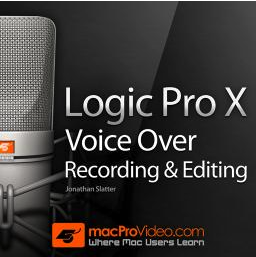
Last year I started working as a Logic Trainer for MacProVideo. My first explainer video course comprised 27 videos on recording, editing and producing voiceovers in Logic Pro.

Recording the video with screenflow Producing the course involved getting pretty familiar with a screen recording software package called ‘Screenflow’, which enables you to produce incredibly polished and professional explainer videos by firstly recording your screen plus audio in real time, and then by allowing you to manipulate and edit the recorded video, add more audio, more video, zoom in, add captions, pictures, sound effects – in fact you can do pretty much anything to turn your plain old screen recording into an engaging and informative explainer video. It’s an amazing piece of software.
Get a free trial of Screenflow here.
screenflow explainer videos
Using Screenflow to record an explainer video about Logic Pro

Voiceover Workflow

My workflow for recording the voiceovers for the course was to record the screencast with Screenflow BUT at the same time record the voiceover into Logic. The voice recordings were made with a Neumann u87 microphone powered by a RME Fireface 400.

Then once finished I would be able to add a little compression and EQ and edit the voiceover quickly and easily in Logic (maintaining the timing references). Once completed I could then import the audio file into Screenflow, and I would have a nicely edited, processed & de-breathed voiceover all ready to work with.

Get in touch if you would like to have a professionally recorded voiceover for your screencast or  a promotional screencast or explainer video produced for your business.
Posted on Leave a comment

Essential software for editing voiceovers (Mac)

voiceover course

I have been recording, editing and producing voiceovers for nearly 25 years, and although I worked on the Windows platform for many years this post is aimed at the Apple Mac user, and looks at some of my go-to software for recording voiceovers.

DAW – Digital Audio Workstation
Logic Pro – Apple

I use Apple’s Logic Pro as my main DAW to record voiceovers, edit voiceovers, mix and produce voiceovers and master the finished voice recordings out to audio files. (wav, mp3 etc).

Logic Pro for voiceovers
Working to Picture in Logic Pro X

Because I also work as a professional composer writing music for TV, Logic Pro is an obvious choice for me because of it’s primary focus on music production.

However although using Logic Pro just for recording voiceovers might be considered overkill,  bear in mind Logic is very competitive on price – just £139.99 from the Apple App Store –  moreover the audio editor is excellent, the workflow super fast, the audio processing effects are first class, and you can work to picture (handy for tv commercials and programmes) and get creative with the huge library of free sound effects and royalty free music it ships with.

Also there is widespread support for learning Logic  – there’s even a Mac Pro Video course dedicated to recording voiceovers in Logic Pro.

voiceover course
Learn how to record voiceovers in Logic

Audacity

http://audacity.sourceforge.net
Audacity for editing voiceovers
Audacity is an excellent free DAW

‘Audacity® is free, open source, cross-platform software for recording and editing sounds.’ If you are looking for a free DAW to record voiceovers then Audacity is a brilliant option. It’s extremely handy for saving audio to a variety of lesser known audio-file types; for example things like creating U-Law CCITT files for phone systems.


 XLD Audio File Conversion

http://sourceforge.net/projects/xld/

I use XLD every day for batch converting audio files. Say you have a bunch of 16bit WAV files and you

XLD
XLD makes audio file conversion a breeze

need to make some 128 kbps MP3 copies then XLD will do the job fast and easily. Plus it’s free. Winner!


Name Mangler

Screen Shot 2015-01-12 at 18.55.47
Batch renaming of files names made easy with Name Mangler

Application for batch renaming files 

If you’ve ever had a load of audio files (or any type of file) which need the file name changing, ‘Name Mangler from Many Tricks’ is a really useful application. You can add text, remove text, add sequential numbers etc.. the possibilities are endless and the time saved…much appreciated.


Posted on Leave a comment

A lady called SADiE changed everything

Analogue Aspirations

When I first started recording and editing voiceovers back in the very early 1990s it was on a 4 track cassette deck, comping together voiceover and singing parts for a book about learning to sing. After that frustrating experience I purchased a 2 track 1/4″ Tascam 32 reel to reel recorder, a chinagraph pencil, editing block and a stash of razor blades.

Editing voiceovers
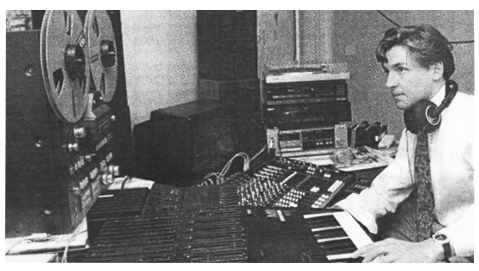
Late 1980s with a Korg M1 keyboard, Tascam 32 1/4″ reel to reel, a Yamaha 4 track cassette multitracker and a Seck mixing desk.

To enable the mixing of music and effects with voiceovers I added another tape machine, this time a Tascam TSR8 8 track multrtracker using 1/2″ tape, a fantastic workhorse on which I mixed hundreds and hundreds of radio and TV ads, which were mastered out onto the 2 channel Tascam 32.

Going digital…with SADiE

In November 1993 a friend from GWR radio in Bristol drove over to my studio in Devizes with the latest in digital audio editing…it went by the intriguing name of SADiE. SADiE was cutting edge digital audio technology in the form of editing software and audio hardware manufactured by British company Studio Audio in Cambridge. Having set up the PC host computer in the studio and connected the chunky breakout cables,  I was given a whirlwind tour of what it could do and well…it was amazing. Never had I seen a digital editor so powerful, fast and accurate. I knew straight away I had to have one – the only hurdle being the price – a mere £7,073.50!

SADIE 24 96
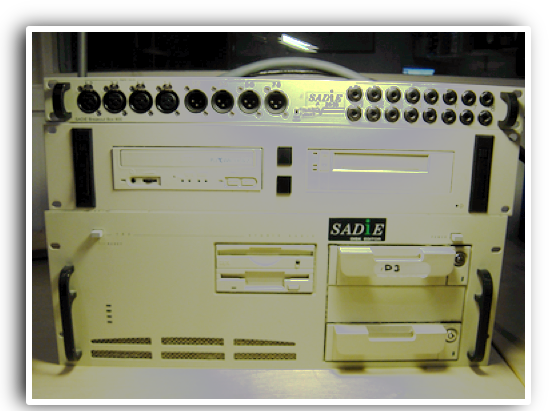
A SADiE 24/96 system with balanced breakout box, CD writer, exabyte backup tape drive and 2 x scisi removable drives

Being able to chop voiceovers and audio up, copy, paste, refine more and move edits around endlessly without having to worry about quality issues or slicing the end of your finger off in the edit, was infectious.  It would open up new tantalising possibilities with sound production and save masses of time. The BBC had already installed several SADiE workstations for radio production and I was hooked.

These days we take the flexibility of digital editing for granted and now could easily (well sort of…)  perform those same editing tasks I was doing on SADiE back in 1993 on an iPhone App, on the Tube, with a double macchiato in our free hand. How times have changed…

At the time it felt as though SADiE was miles ahead in the world of audio editing, and I stayed with it as my my DAW (Digital Audio Workstation) for many years adding an 8 track version, the 24/96 in 1995. After using Cool Edit for a while,  which became the hugely successful Adobe Audition,  I settled on Apple’s Logic Pro, much because it was my DAW of choice for music production and it made sense to stick to one application. Also the audio editing and picture sync on Logic are excellent and the workflow is extremely fast.

If you would like to record and edit voiceovers on Logic Pro…there’s a very good video course for doing just that…

voiceover course
How to record and edit voiceovers in Logic Pro. MacProVideo Course

Update as of 2022: I am now mostly using Reaper for voiceover editing. Whilst Logic is a great DAW, Reaper is faster for dialogue editing. Voiceover course on Reaper coming soon.