Do you need an instore announcement for your company or business. Same day recording service available – just email jono@jonoslatter.co.uk to start the ball rolling.
Female voice on this NatWest Life Announcement is Sally Bailey
Prompt 1Please stay on the line, someone will be with you very shortly. Prompt 2Please continue to hold, thank you. Prompt 3We do appreciate you taking the time to hold, your call will be connected as soon as someone is available. Thank you for your patience. Prompt 4We do know you’re waiting, and will be with you as soon as we can. Thank you for your patience. Prompt 5 Thanks for hanging on – we’ll be with you as soon as we can Prompt 6 Please continue to hold – thank you Prompt 7 Thank you for staying on the line – we know you’re there and will be with you as soon as we can Prompt 8 We do know you’re waiting and will be with you as soon as we can. Thank you for your patience. Audio designed to then loop to start.
£29.99 + vat. Available instantly after purchase. Download includes MP3 & uLaw WAV files. Includes license to use the recording for one business in one geographical location in perpetuity
Some telephone hold audio systems require WAVs in the 8bit 8000hz (8kHz) mono u-law format. You can render out to this file type in Reaper.
Render settings for u-law WAV file output in Reaper
Reaper Render Settings: Sample rate: 8000Hz Channels: Mono Format: WAV WAV Bit Depth: 8 bit u-law
If you need OnHold Audio messages recording for your business please click here. Same day service available and competitive rates. Or email Jono on jono@jonoslatter.co.uk or call 07738 470011.
Gutenberg currently only has an audio block for inserting single audio files into your WordPress blog, and not an audio playlist option.
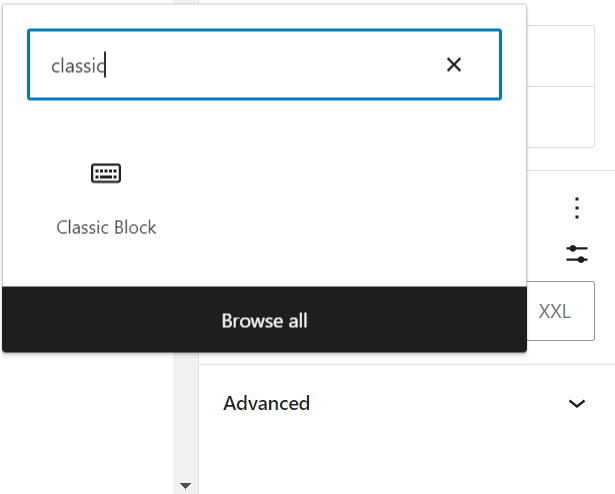
Easiest way round this I have found is to just add a new ‘Classic’ block using Gutenberg, and then create your audio playlist in the normal ‘classic’ way. It may not be the best looking playlist but it works very well and remember if you add a featured image to your audio file it will show up in the top of the playlist when selected.
Also, if using the audio block in Gutenberg to add multiple audio players on one page, then annoyingly starting one player does not stop an existing player. So if adding a few audio players on a page I find it better to use an html block and add audio in the old way, with the shortcode:
[audio src="https://www....mp3"]
However, what this lacks over the Gutenberg audio block is a download option. To fix this, you can add a Gutenberg file block and link it to the same audio by selecting it from your media library. (you can also upload a new file)
This will create a title and download button, but you can delete or edit the title if preferred, like I have here and place it under your audio player.
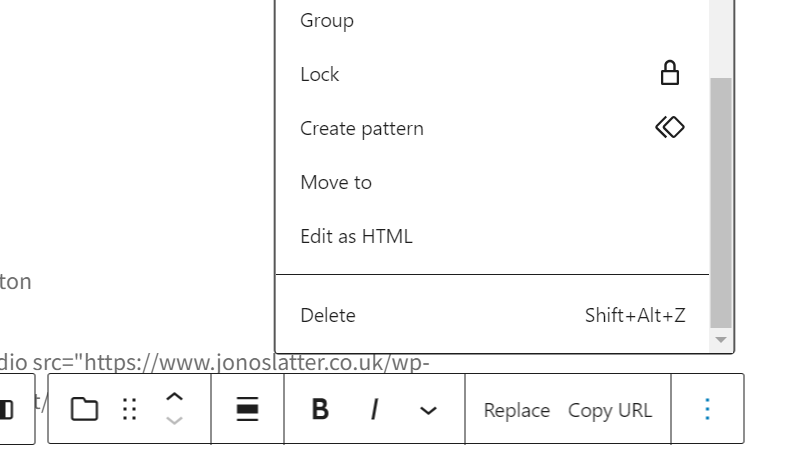
TIP! If you want to edit the file in the download button later, click the three dots in the block options and chose: ‘Edit as HTML’.
This can affect rendering tracks to stems as well as bouncing out or rendering your project.
With the default render setting of full speed offline, Reaper tries to render at the fastest possible speed. This can cause problems with instruments with long release tails (e.g. strings). It’s easy to change this in the main render dialogue – just change it to 1x offline and all should be fine.
If you want to render tracks to stems, it’s more tricky as there is no dialogue to change the render process. But you can do it with an action:
You’ll need the SWS extensions installed. Go to the action list and search for: ‘Toggle render speed (apply FX/render stems) realitime / not limited.‘ I created a shortcut so I can toggle the render speed easily. If unlimited render causes glitches toggle to realtime.
Render tracks to stems obeying time selection…
While we are rendering stems – which can be done by right clicking the track and looking for the render/freeze options. There is another SWS action that will render tracks to stems BUT obeying time selection – rather than whole project. Just search for Render tracks to stereo stem tracks, obeying time selection. Create a shortcut for that one too if you render stems often.